数据仓库 vs 数据湖 vs 数据网格
来源: ByteByteGo (主流模式)
✂️ Cut your QA cycles down to minutes with QA Wolf (Sponsored)

If slow QA processes bottleneck you or your software engineering team and you’re releasing slower because of it — you need to check out QA Wolf.
QA Wolf’s AI-native service supports web and mobile apps, delivering 80% automated test coverage in weeks and helping teams ship 5x faster by reducing QA cycles to minutes.
QA Wolf takes testing off your plate. They can get you:
Unlimited parallel test runs for mobile and web apps
24-hour maintenance and on-demand test creation
Human-verified bug reports sent directly to your team
Zero flakes guarantee
The benefit? No more manual E2E testing. No more slow QA cycles. No more bugs reaching production.
With QA Wolf, Drata’s team of 80+ engineers achieved 4x more test cases and 86% faster QA cycles.
This week’s system design refresher:
Coding Agents Explained: How Claude Code, Codex & Cursor Actually Work (Youtube video)
Data Warehouse vs Data Lake vs Data Mesh
API Concepts Every Software Engineer Should Know
Polling vs Long Polling vs Webhooks vs SSE
SLA vs SLO vs SLI
Build with Claude Code — Course Direction Survey
Coding Agents Explained: How Claude Code, Codex & Cursor Actually Work
Data Warehouse vs Data Lake vs Data Mesh
Storing data is the easy part. Deciding where and how to organize it is the real challenge.
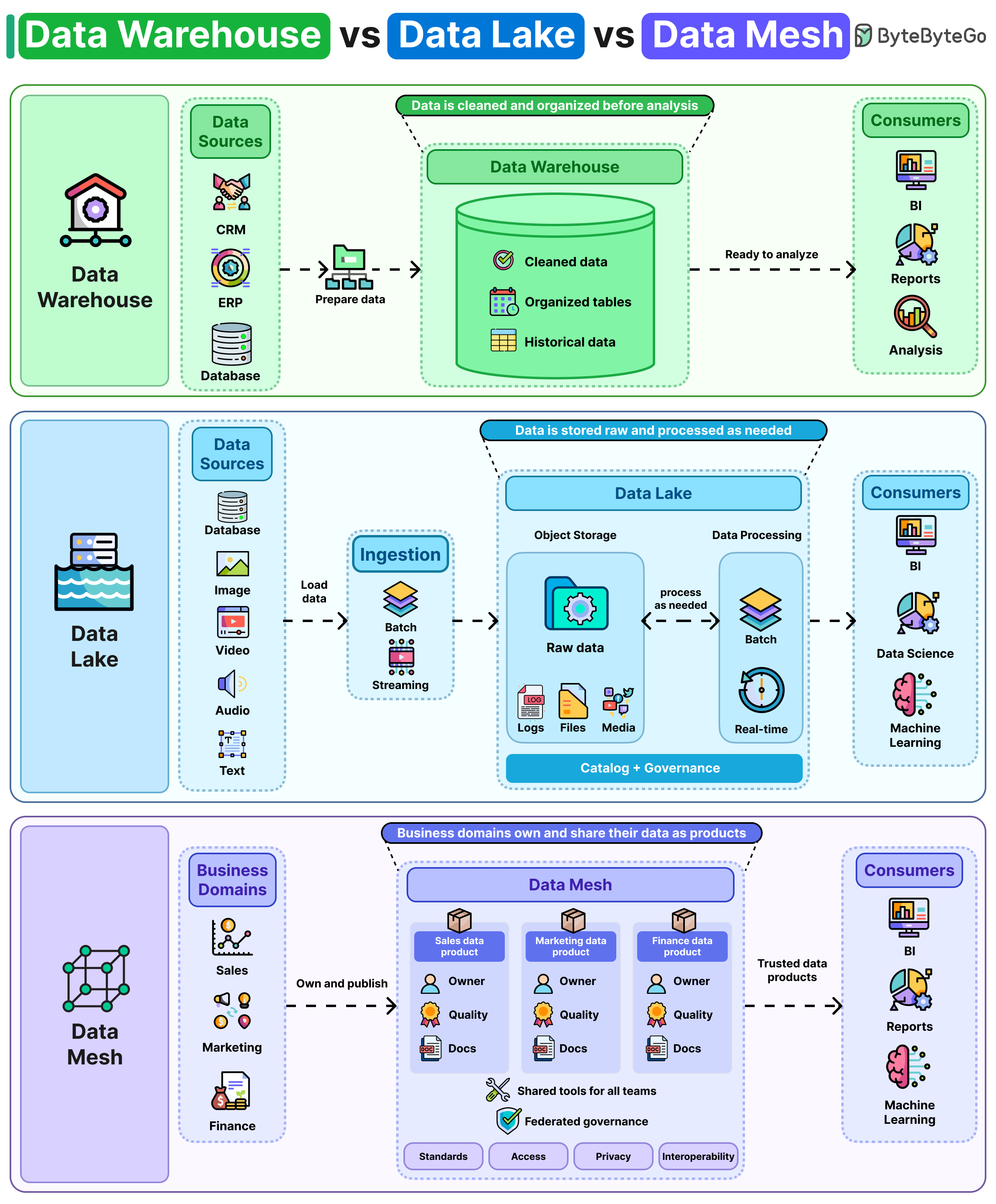
A data warehouse is the traditional approach. It cleans and structures data before storing it. Queries run fast, and reports stay consistent. But adding a new data source takes effort because everything has to fit the schema first.
A data lake takes the opposite approach. It stores everything raw, like databases, logs, images, and video. Process it when you need it. The flexibility is great, but if rules around naming, formatting, and ownership are not properly set, you end up with duplicate, outdated, and undocumented data that is hard to manage.
Data mesh shifts data ownership from a central team to individual departments. For example, sales publishes sales data, and finance publishes finance data. Shared standards keep things compatible across teams.
It works well in larger organizations. But it requires every team to have the right people and processes to manage their data quality, documentation, and access, which is a challenge.
In practice, many companies use more than one approach. They'll use a warehouse for dashboards and reporting, a lake for machine learning workloads and start applying mesh principles as teams scale.
API Concepts Every Software Engineer Should Know
Most engineers use APIs every day. Sending a request and reading JSON is one thing. Designing an API that other people can rely on is something where things get complicated.
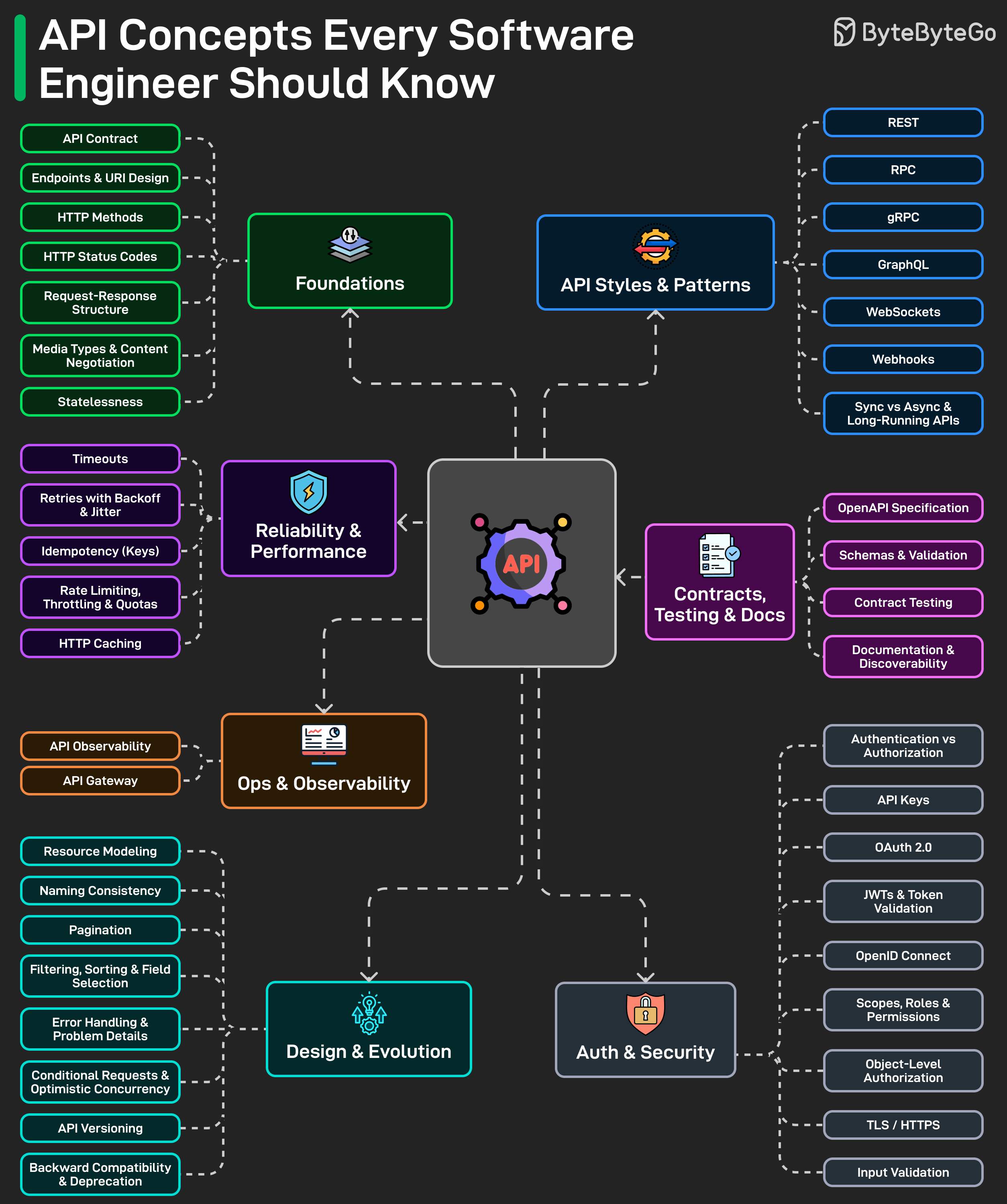
A lot of problems begin with basic HTTP details that seem small at first. Methods, status codes, request formats, and response structure can make an API feel clear and predictable, or confusing and inconsistent.
Then there are the bigger design choices. REST, GraphQL, gRPC, webhooks, and WebSockets each make sense in different situations. The challenge is knowing what actually fits the system and the use case.
A lot of API problems also comes from design decisions that do not get enough attention early on. Naming, pagination, versioning, error responses, and backward compatibility often decide whether an API is easy to work with or frustrating to maintain.
Security is another area where weak decisions can cause real problems. API keys, OAuth, JWTs, scopes, and permissions are easy to mention. Getting them right is harder, and mistakes here can be costly.
Reliability matters too. Timeouts, retries, idempotency, rate limits, and caching are often easy to ignore until the system is under pressure.
And once an API starts growing, the supporting work matters too. Clear documentation, solid specs, observability, and contract testing make it much easier for teams to trust the API and use it without guessing how it works.
Over to you: What’s the most overlooked API concept in your experience?
Polling vs Long Polling vs Webhooks vs SSE
Four ways to get updates from a server. Each one makes a different tradeoff between simplicity, efficiency, and real-time delivery.
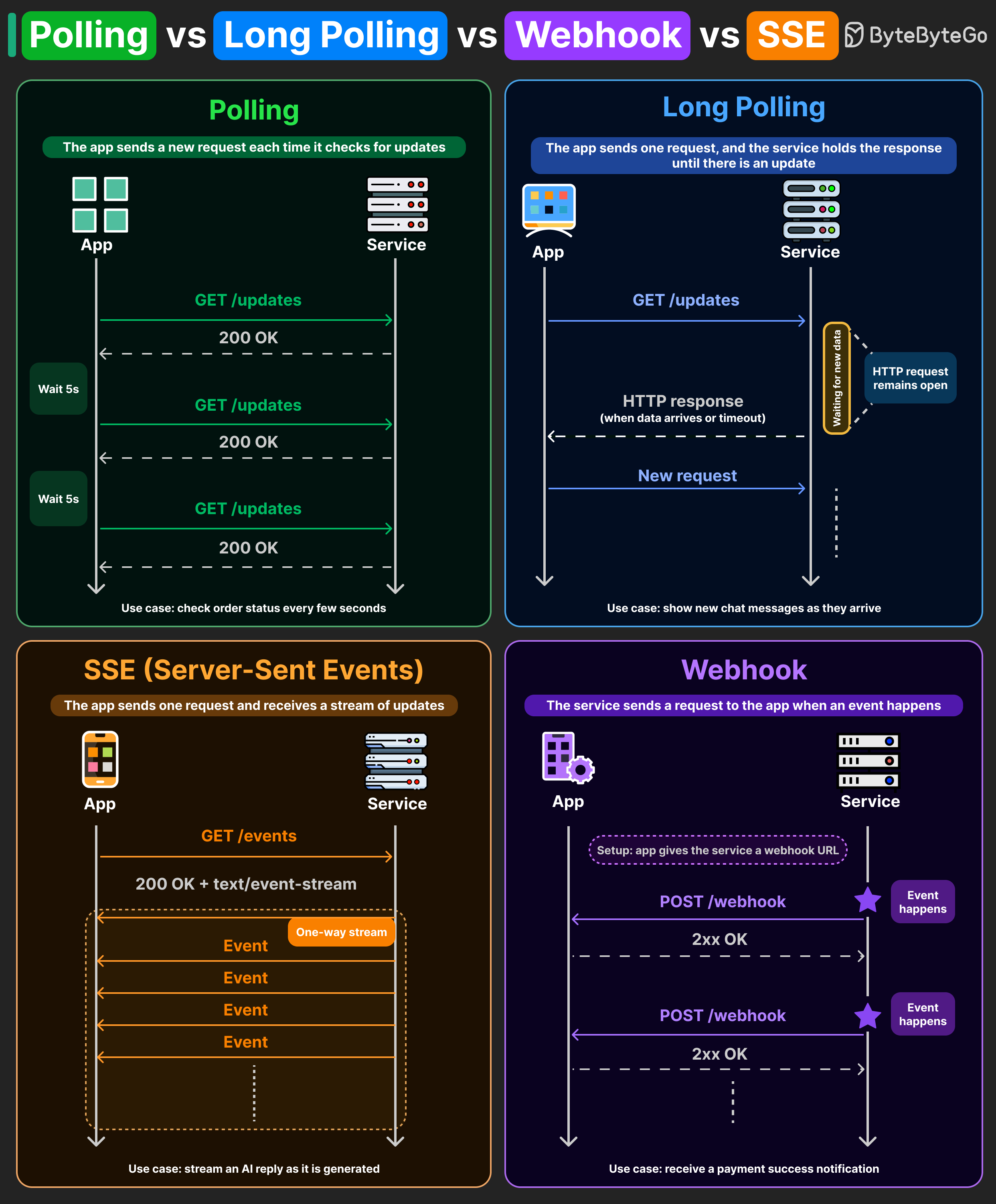
Here's how they compare:
Polling: The client sends a request every few seconds asking "anything new?" The server responds immediately, whether or not there's new data. Most of those requests come back empty, wasting client and server resources. For use cases like an order status page where a small delay is acceptable, polling is the simplest option to implement.
Long Polling: The client sends a request, and the server keeps the HTTP connection open until new data is available or a timeout occurs. This means fewer empty responses compared to regular polling. Some chat applications used this pattern to deliver messages closer to real-time communication.
Server-Sent Events (SSE): The client opens a persistent HTTP connection, and the server streams events through it as they're generated. It is one-way, lightweight, and built on plain HTTP. Many AI responses that appear token by token are delivered through SSE, streaming each chunk over a single open connection.
Webhooks: Instead of the client asking for updates, the service sends an HTTP POST to a pre-registered callback URL whenever a specific event occurs. Stripe uses this for payment confirmations. GitHub uses it for push events. The client never polls or holds a connection open, it just waits for the server to call.
Many systems don't rely on a single pattern. You may use polling for order status, SSE for streaming AI responses, and webhooks for payment confirmations.
SLA vs SLO vs SLI
These three terms are related, but they mean different things. Knowing the difference helps you define what to measure, aim for, and promise your customers.
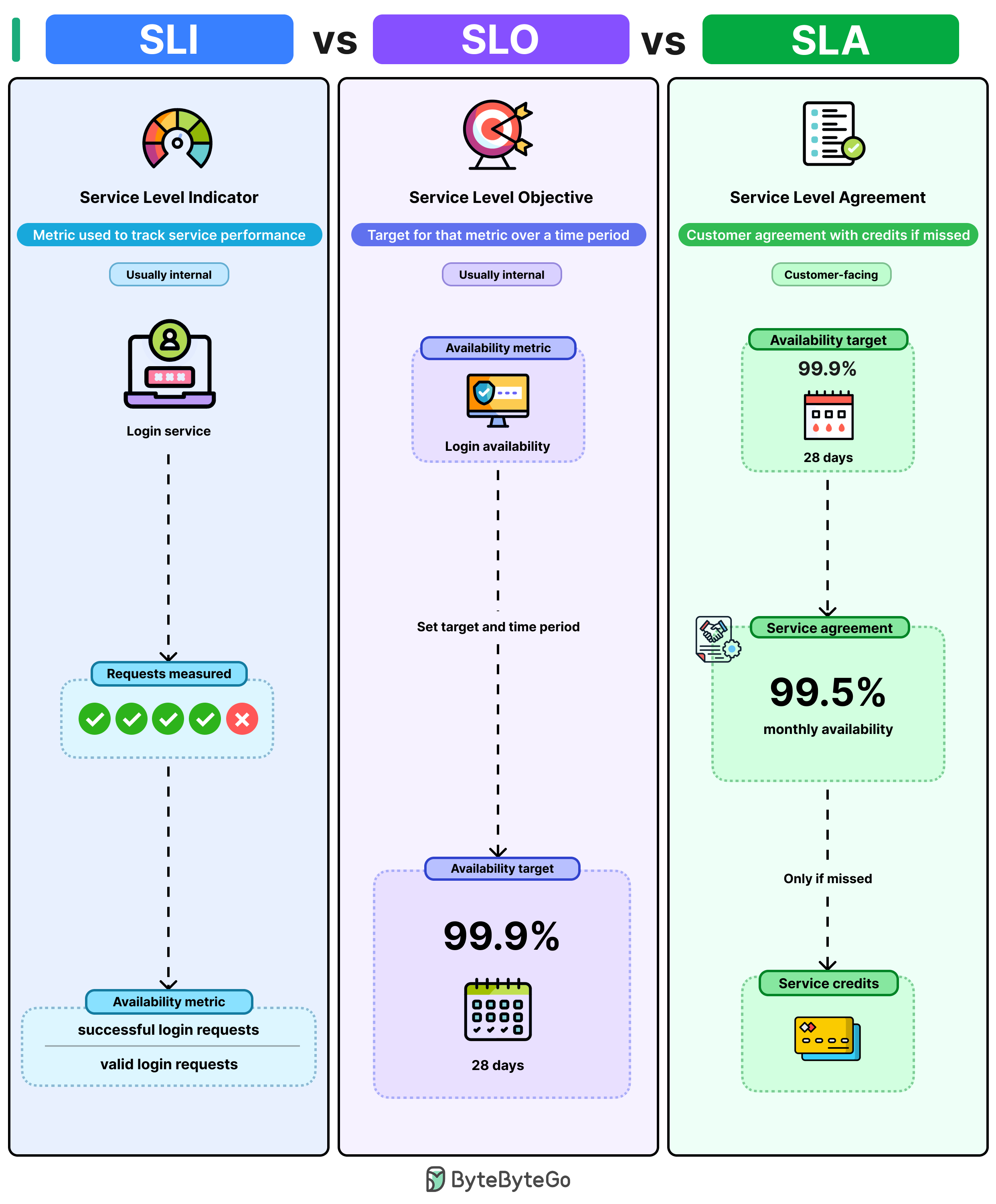
Here's how they actually connect:
SLI (Service Level Indicator): This is the metric you're measuring. For a login service, it could be the ratio of successful login requests to total valid requests. It tells you how your service is performing right now.
SLO (Service Level Objective): You take that SLI and define a target around it. Something like "login availability should stay above 99.9% over a rolling 28-day window." When you're missing your SLO, it’s a signal to find out what's failing before customers notice.
SLA (Service Level Agreement): This is what you promise your customers in a contract. It's usually set lower than the SLO, say 99.5% monthly availability. If you breach it, you owe service credits.
If your SLO and SLA are both set to 99.9%, then the moment your availability drops below 99.9%, you've already breached the agreement.
The SLI tells you where you stand. The SLO tells you where you should be. The SLA tells your customers what they can expect.
Over to you: How do you decide what the right SLO target is when you're launching a new service?
Build with Claude Code — Course Direction Survey
We’re building a new course, Build with Claude Code, and we’d love your input before we finalize it.
If you’re an engineer or engineering leader, we’d appreciate 3 minutes of your time. Your answers will directly shape what we cover. Thank you so much!